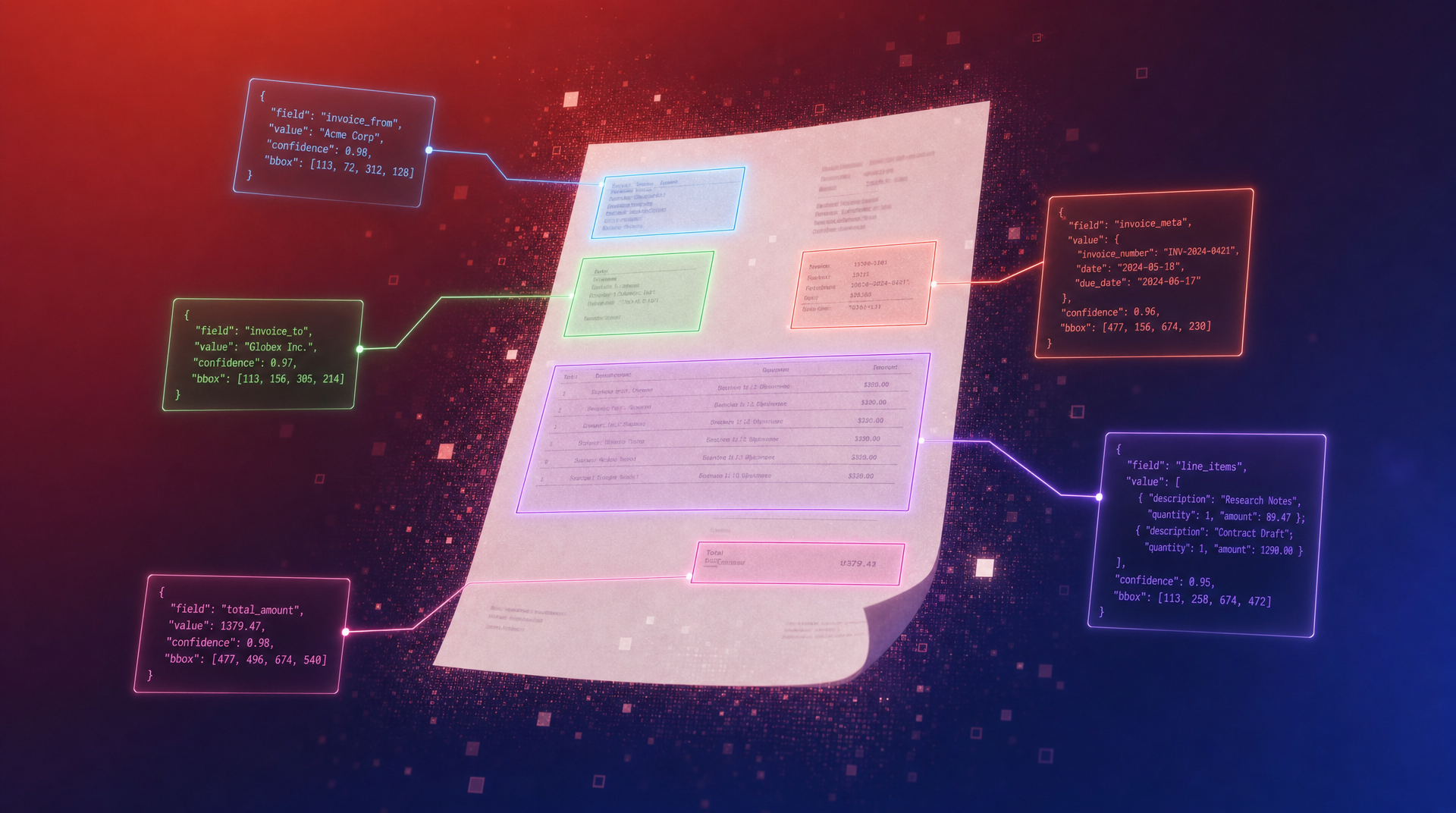
Launching Bounding Boxes: Show Your Users Exactly Where Their Data Came From
Every extracted field now includes the exact page coordinates of its source. Build provenance into your product with one flag.

When you extract data from a document, the most common question is: "Where did this number come from?"
Until now, the answer required going back to the original document and searching for it manually. Today, Bem answers that question automatically. Every extracted field now includes the exact coordinates of where it was found on the page.
What Shipped
Bounding boxes are now available on all Extract functions. Enable them with a single flag, and every field in your output includes page, left, top, width, and height coordinates. The coordinates are normalized to [0, 1], so they work at any resolution.
1curl -X POST https://api.bem.ai/v3/functions \2 -H "x-api-key: $BEM_API_KEY" \3 -H "Content-Type: application/json" \4 -d '{5 "functionName": "invoice-extractor",6 "type": "extract",7 "enableBoundingBoxes": true,8 "outputSchema": {9 "type": "object",10 "properties": {11 "vendor_name": { "type": "string" },12 "invoice_number": { "type": "string" },13 "total_amount": { "type": "string" },14 "line_items": {15 "type": "array",16 "items": {17 "type": "object",18 "properties": {19 "description": { "type": "string" },20 "amount": { "type": "string" }21 }22 }23 }24 }25 }26 }'
One flag: enableBoundingBoxes: true. That's it.
What the Output Looks Like
Here's a real extraction from a 3-page bank statement. The API returns the extracted data alongside a fieldBoundingBoxes object that maps every field to its location on the page:
1{2 "transformedContent": {3 "bank_name": "usbank",4 "account_holder": "MR JOHN DOE",5 "account_number": "1 234 3456 6789",6 "statement_period": "Jul 17, 2019 through Aug 15, 2019",7 "beginning_balance": "405.75",8 "ending_balance": "384.50",9 "total_deposits": "1,150.00",10 "deposits": [11 { "date": "Jul 17", "description": "Visa Direct PAYPAL*Perlow Al", "amount": "99.00" },12 { "date": "Jul 18", "description": "Zelle Instant PMT From ARNO PERLOW", "amount": "100.00" }13 ],14 "withdrawals": [15 { "date": "Jul 17", "description": "Debit Purchase VISA APL* ITUNES.COM", "amount": "14.43" },16 { "date": "Jul 18", "description": "Debit Purchase VISA PANERA BREAD #60", "amount": "23.57" }17 ]18 },19 "fieldBoundingBoxes": {20 "/bank_name": [{ "page": 1, "left": 0.128, "top": 0.0, "width": 0.189, "height": 0.031 }],21 "/account_holder": [{ "page": 1, "left": 0.133, "top": 0.175, "width": 0.092, "height": 0.01 }],22 "/deposits/0/amount": [{ "page": 1, "left": 0.897, "top": 0.42, "width": 0.06, "height": 0.01 }],23 "/withdrawals/0/amount": [{ "page": 1, "left": 0.91, "top": 0.72, "width": 0.05, "height": 0.01 }]24 }25}
Coordinates are fractions of the page dimensions. To draw a box on a 1000x1400 pixel image: multiply left and width by the image width, top and height by the image height.
Tracing Summary Fields
Here's the same bank statement with bounding boxes rendered for each extracted summary field. Each color represents a different field:
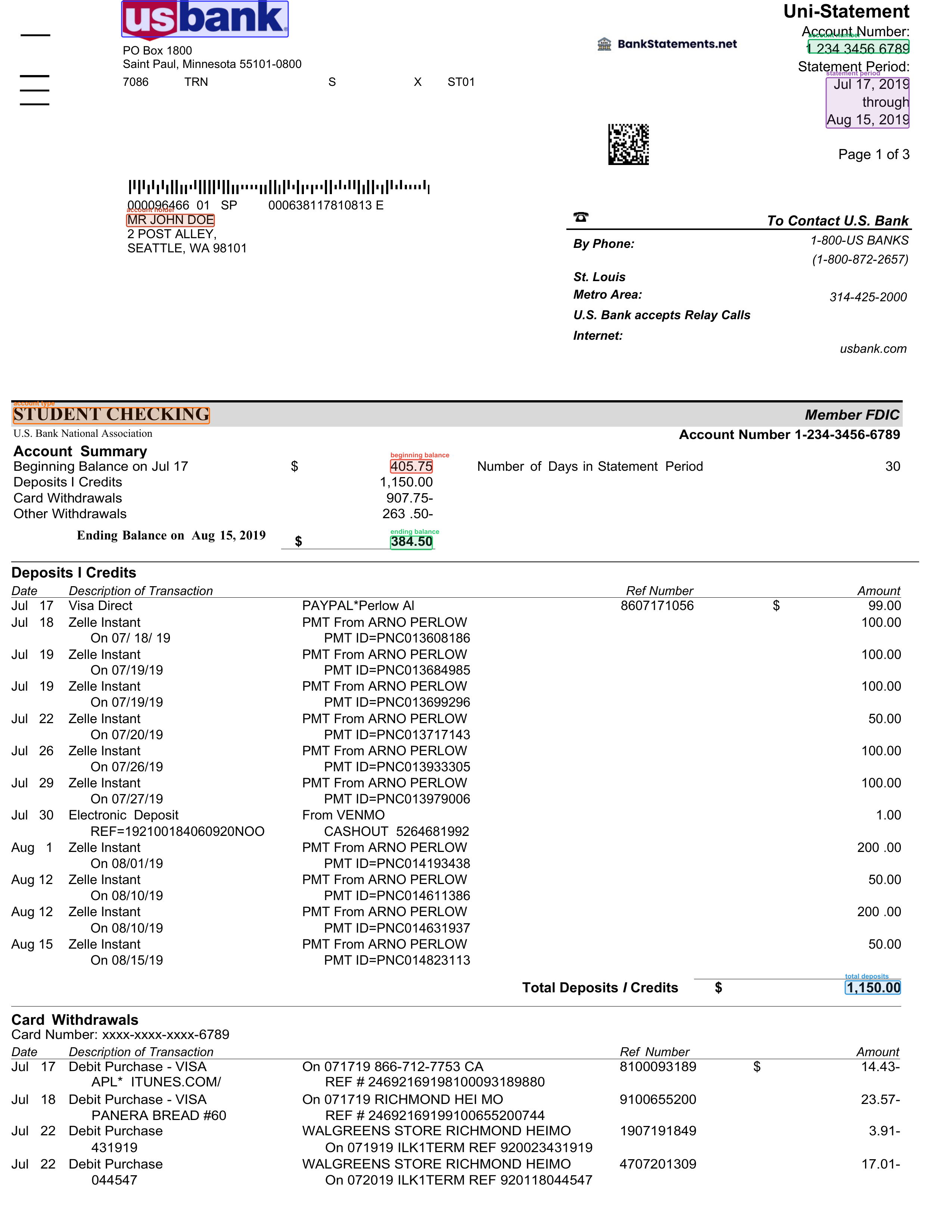
Bank name, account holder, account number, statement period, beginning balance, ending balance, total deposits, total withdrawals. Nine fields, nine boxes, each pointing to exactly where the value was found.
Tracing Individual Transactions
Bounding boxes work on arrays too. This extraction pulled 12 deposits and 47 withdrawals from a 3-page statement. Every transaction amount and description has its own bounding box:
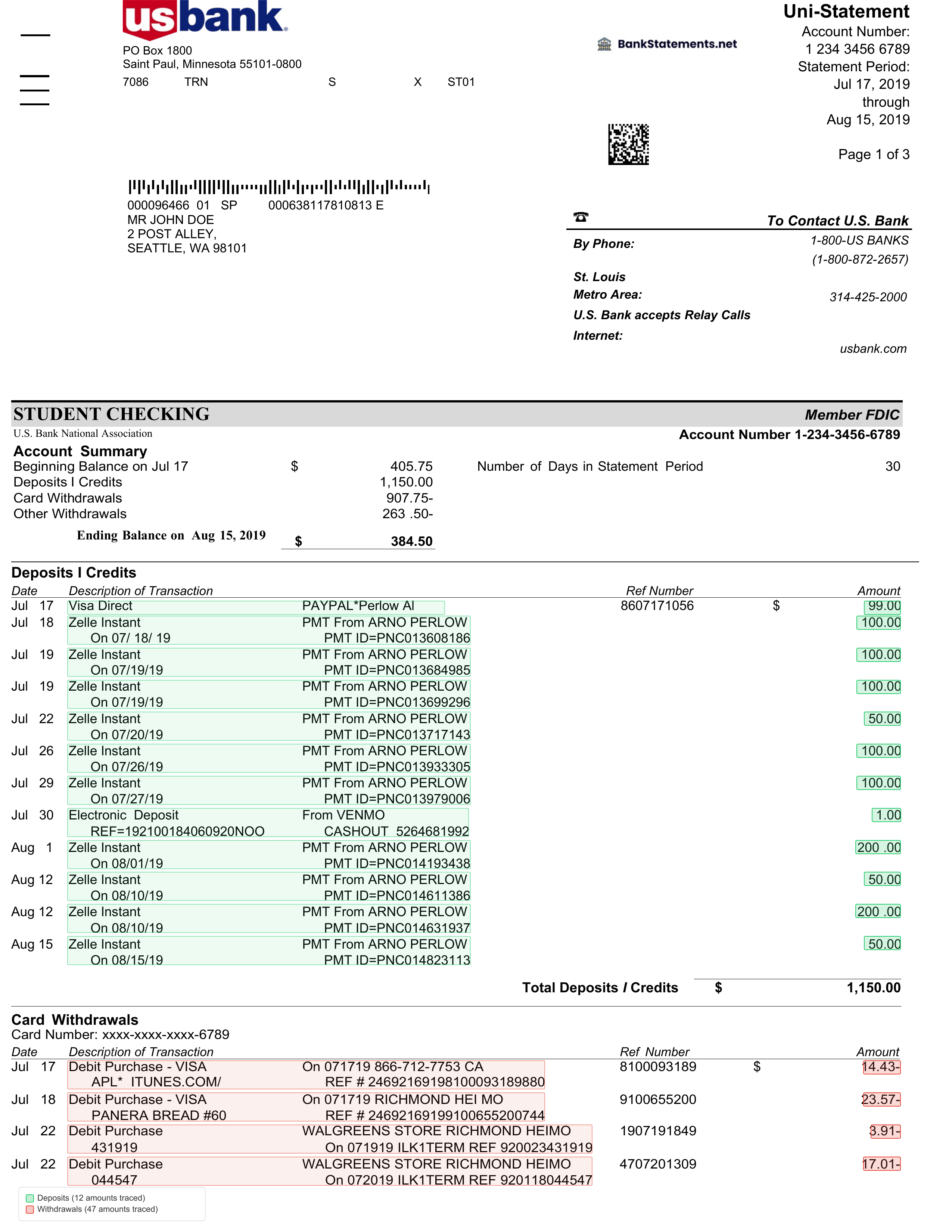
Green boxes mark deposit amounts. Red boxes mark withdrawal amounts. 186 bounding boxes total across 59 transactions.
Works Across Pages
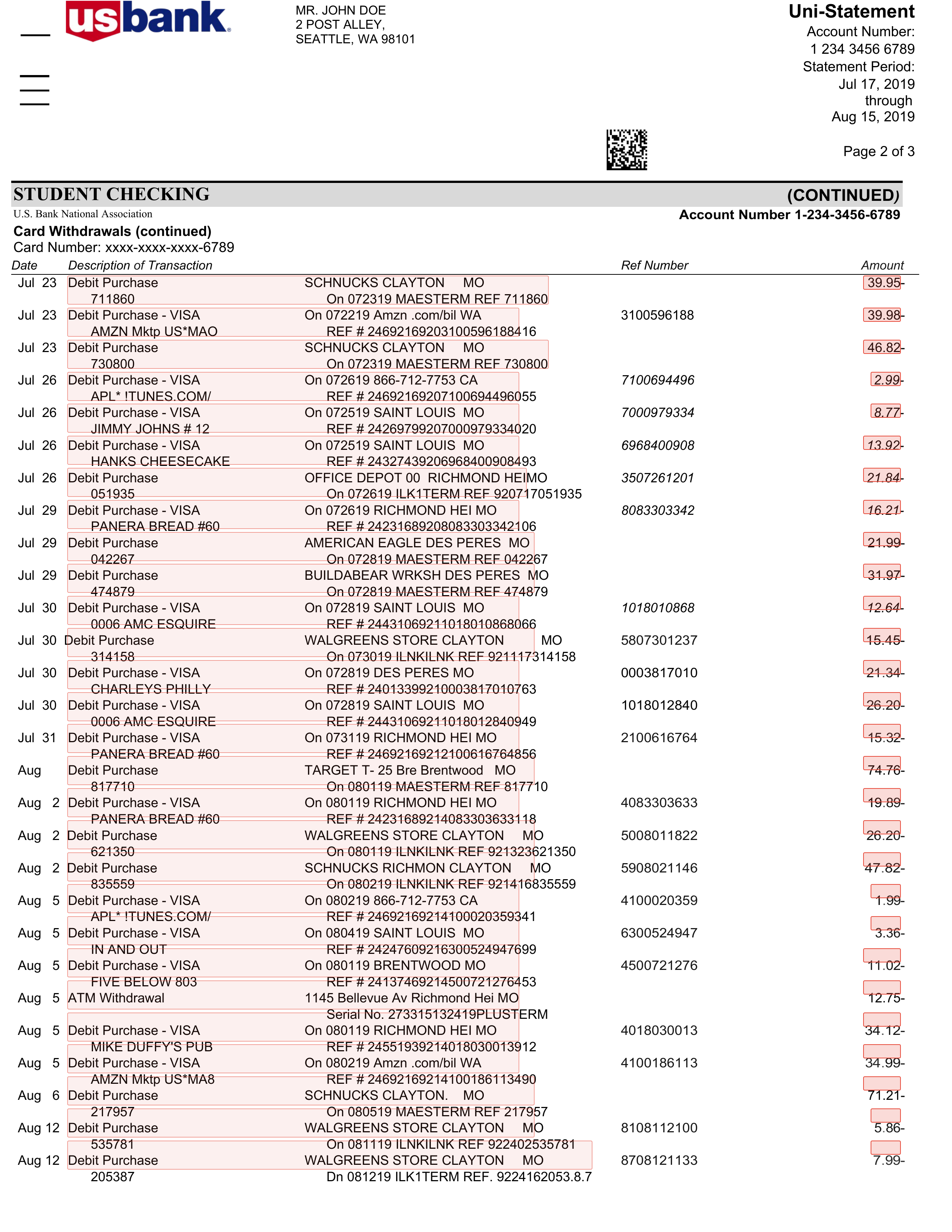
Bounding boxes track coordinates across every page of the document. Here's page 3 of the same statement, showing withdrawal provenance continuing from pages 1 and 2:
The UX This Unlocks
This isn't a debugging feature. It's a product feature your users will see.
Think about what your application looks like when every piece of extracted data is clickable. A user reviews an invoice in your platform. They see the total amount. They click it. The original document scrolls to the exact location and highlights the number. No searching. No squinting at a PDF. The data proves itself.
This changes the trust model of AI extraction. Instead of asking users to blindly trust the output, you're giving them a visual bridge between the structured data and the source document. The AI becomes transparent.
Some of the experiences our customers are building:
- Claims review portals where adjusters click a claim amount and see it highlighted on the original loss run. Every field traces back to ink on paper.
- Contract analysis dashboards where legal teams hover over an extracted clause and the original document highlights the exact paragraph. No more "where did the AI get this?"
- Financial reconciliation tools where accountants click a transaction and see it pinpointed on the bank statement, invoice, or receipt it was extracted from.
- Audit-ready document processing where every extracted field carries a visual provenance chain. Regulators can trace any number back to its source in seconds.
The pattern is the same: your user sees structured data on the left, the original document on the right. They click a field. The document scrolls and highlights. Trust is immediate because the proof is visual.
Bounding boxes make this a few lines of frontend code instead of a research project.
How to Draw a Bounding Box
Given a page image of pixel dimensions W x H, a bounding box object { page, left, top, width, height } maps to a rectangle at:
x = left * Wy = top * H- box width =
width * W - box height =
height * H
1# Python example: draw bounding boxes on a page image2from PIL import Image, ImageDraw3import json45img = Image.open("bank-statement-page1.png")6W, H = img.size7draw = ImageDraw.Draw(img)89bbox_data = result["fieldBoundingBoxes"]10for field, boxes in bbox_data.items():11 for b in boxes:12 if b["page"] != 1:13 continue14 x = b["left"] * W15 y = b["top"] * H16 w = b["width"] * W17 h = b["height"] * H18 draw.rectangle([x, y, x + w, y + h], outline="red", width=2)1920img.save("annotated.png")
Getting Started
Bounding boxes are available today on all Extract functions. To enable them:
- Set
enableBoundingBoxes: truewhen creating or updating your function - Or check "Enable bounding boxes" in the function settings in the Bem dashboard
Bounding boxes are included in the output at no additional cost. They work on PDFs, images, and any document type that Bem supports.
Read the API documentation for the full field specification.
Written by
Antonio Bustamante
May 1, 2026 · Engineering


Ready to see it in action?
Talk to our team to walk through how Bem can work inside your stack.
Talk to the team