Docket: turning a Supreme Court opinion into a legal-AI app
The Supreme Court’s birthright-citizenship ruling runs 194 pages: a majority, two concurrences, and three dissents. We turned it into Docket, an open-source legal-research app, to show what you can build on bem. The full opinion, an interactive knowledge graph, and an agent that answers with citations while reading only what it needs.

As you have likely seen, the Supreme Court handed down a closely watched ruling on birthright citizenship in Trump v. Barbara (No. 25-365), decided June 30, 2026. We do not have a position on the holding. What caught our attention was the document: a 194-page opinion with a majority, two concurrences, and three dissents, dense with precedent and cross-references. It is exactly the kind of unstructured input bem was built for.
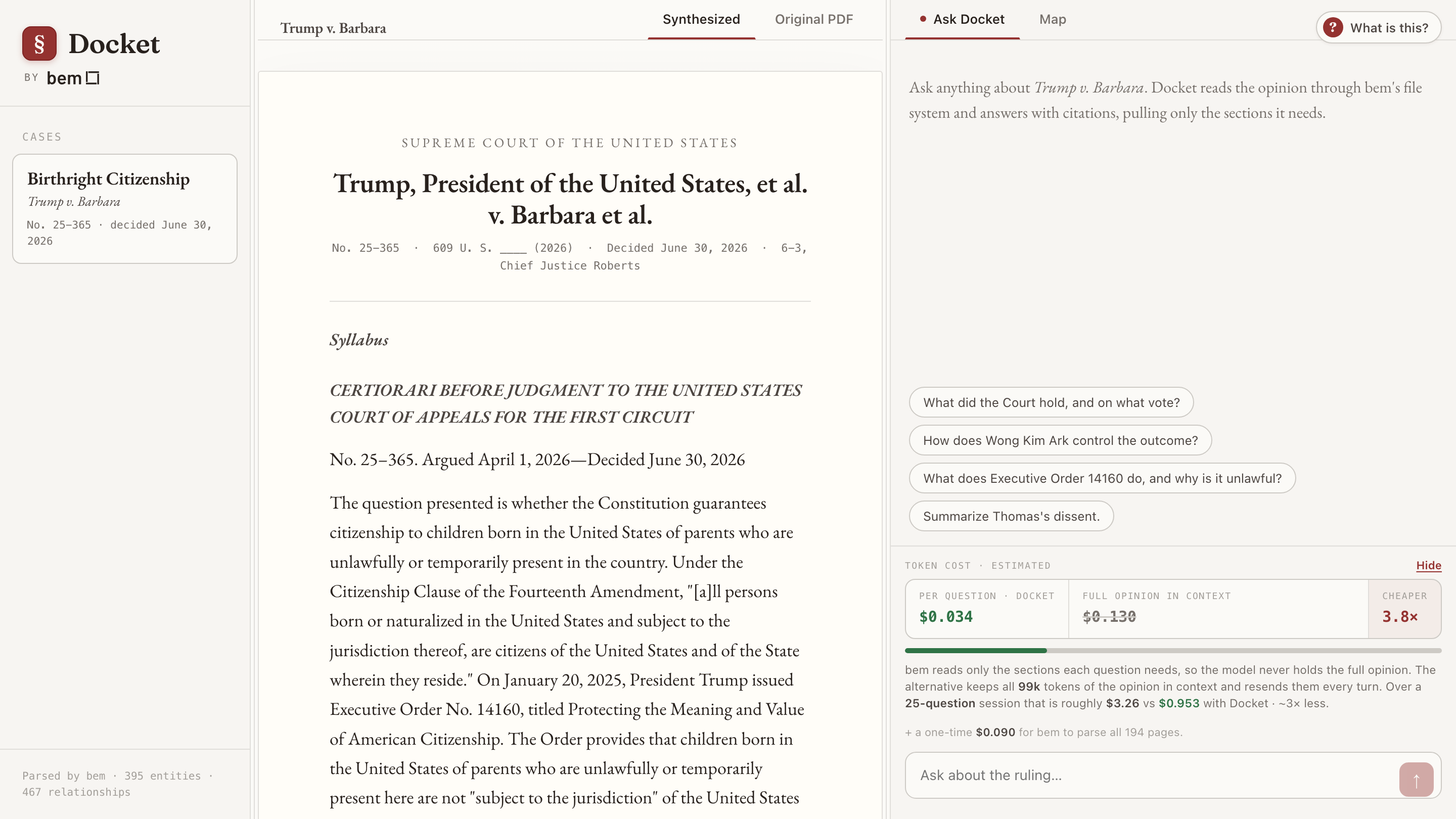
So we built Docket, a small open-source legal-research app, and put it online at docket.bem.dev. One case, three views: the full opinion as a clean structured document, an interactive knowledge graph of the parties, precedents, and authorities, and an agent you can ask questions that answers with citations you can click to jump to the exact page.
A 194-page document problem
A modern Supreme Court opinion is not one document. Trump v. Barbara is six: Chief Justice Roberts writes for the Court, Justice Jackson concurs, Justice Kavanaugh concurs in the judgment and dissents in part, and Justices Thomas (joined by Gorsuch), Gorsuch, and Alito each dissent. The opinions argue with each other across hundreds of pages, chained to precedents like United States v. Wong Kim Ark, Dred Scott v. Sandford, and the Civil Rights Act of 1866, with citations that point backward and forward by page.
There are two common ways to put a document like this in front of an AI, and both have a problem.
Chunk and embed it (RAG). Fast and cheap, but slicing a 194-page opinion into fixed windows shreds exactly the structure that matters: which justice wrote what, where a dissent begins, how a holding connects to the precedent it rests on.
Stuff the whole thing in context. Accurate, but expensive, and it gets more expensive every turn. Chat APIs are stateless, so the full opinion is resent on every single message. The model also has to re-find the relevant passage from 98,632 tokens each time you ask.
Docket takes a third path: let bem give the document structure first, then let an agent read only the parts each question touches.
Step one: parse the opinion into structure
bem Parse turns the raw slip opinion into clean, labeled sections: titles, subtitles, and paragraphs, each tagged with its page number. The same pass routes the file into a named bucket so the structured output has a home.
1# Parse the 194-page slip opinion into a structured bucket2curl -X POST https://api.bem.ai/v3/parse \3 -H "x-api-key: $BEM_API_KEY" \4 -F "file=@trump-v-barbara.pdf" \5 -F 'parseConfig={"defaultBucket":"Docket Birthright Citizenship"}'
Out comes a list of 1,056 typed sections. That alone is enough to render the opinion as a real document rather than a wall of PDF text. It also gives the agent a table of contents: by reading the running headers, Docket knows the Court opinion runs pages 6 to 31, Jackson concurs 32 to 52, Kavanaugh 53 to 61, Thomas dissents 62 to 152, Alito 153 to 191, and Gorsuch 192 onward. When you ask about Thomas’s dissent, the agent does not search blindly. It knows where to look.
Step two: a knowledge graph of the opinion
The same parse extracts a typed entity graph: 395 entities and 467 relationships across parties, justices, precedents, statutes, courts, and holdings, each edge carrying the evidence span and page where it appears. Here is the live graph from the app. Drag a node, zoom, and click any entity to see how it connects.
The structure of the argument falls right out of it. United States v. Wong Kim Ark sits near the center, tied to the Citizenship Clause, the Fourteenth Amendment, and the Civil Rights Act of 1866, with Dred Scott and Elk v. Wilkins hanging off the precedent chain the dissents lean on. You can read the shape of the disagreement before you read a word of the opinion.
Step three: an agent that reads only what it needs
The agent reaches the opinion through bem’s file system, the same way you would explore a directory: list what is there, search for a phrase, then read the specific sections that matter. It never holds the full opinion in context.
1# The agent's three moves, over the parsed bucket2# ls — list the opinion's structure3curl -X POST https://api.bem.ai/v3/fs \4 -H "x-api-key: $BEM_API_KEY" \5 -d '{"bucket":"Docket Birthright Citizenship","op":"ls"}'67# find — grep for a phrase, get back matching sections + pages8curl -X POST https://api.bem.ai/v3/fs \9 -H "x-api-key: $BEM_API_KEY" \10 -d '{"bucket":"Docket Birthright Citizenship","op":"find","query":"subject to the jurisdiction"}'1112# cat — read only the sections it decided it needs13curl -X POST https://api.bem.ai/v3/fs \14 -H "x-api-key: $BEM_API_KEY" \15 -d '{"bucket":"Docket Birthright Citizenship","op":"cat","pages":[62,63,64]}'
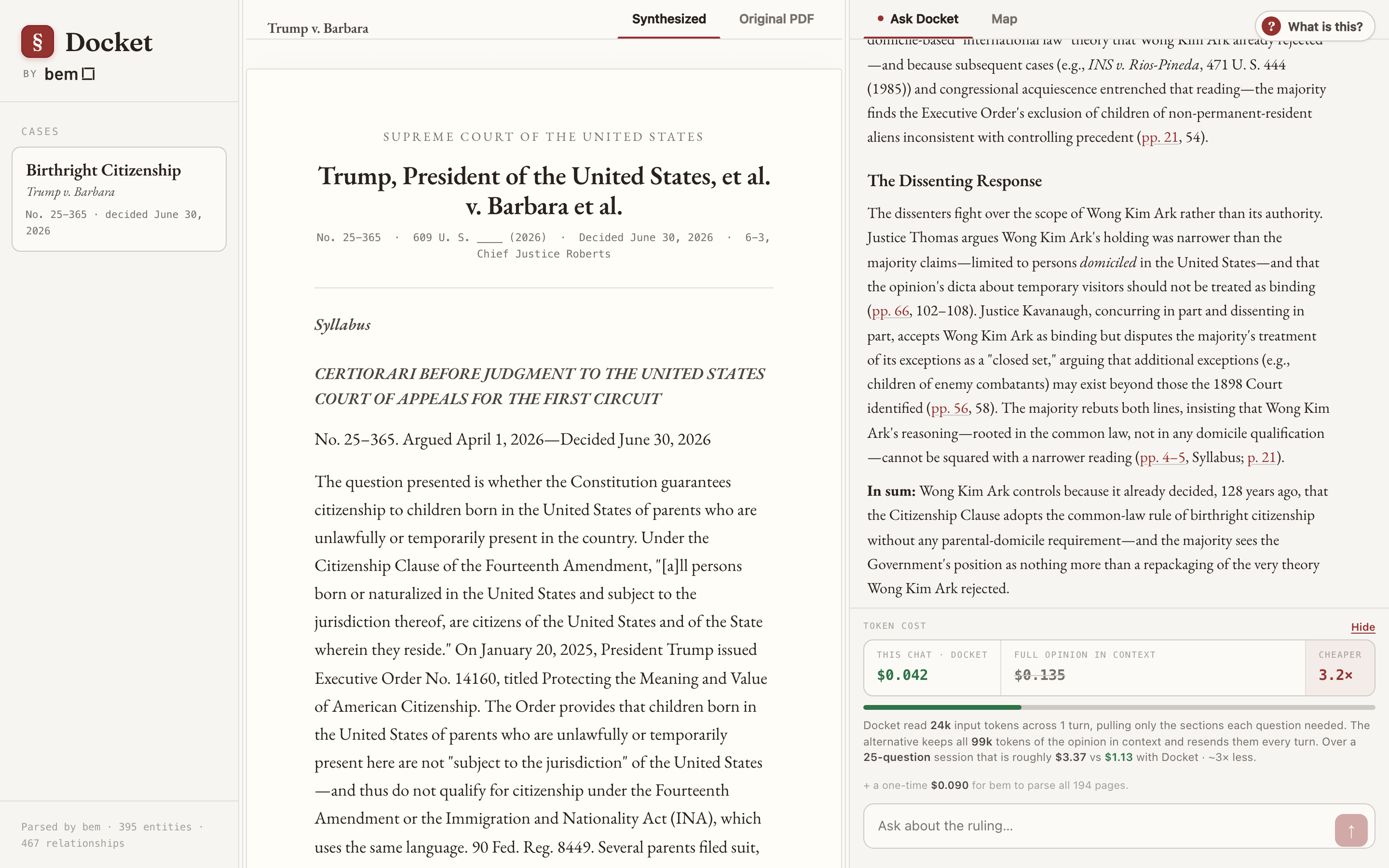
Wired into a tool-calling loop, that is the whole agent. Ask it to summarize Thomas’s dissent and it lists the structure, jumps to pages 62 onward, reads a few, and answers, with citations like (Thomas, J., dissenting, p. 64) that are clickable in the app and scroll the opinion to that exact page.
The cost of context
This is where reading slices instead of the whole document stops being an architecture preference and becomes a line item. Because chat APIs are stateless, the only way to keep a 98,632-token opinion "in context" is to resend all 98,632 tokens on every turn. Docket reads a few thousand tokens per question instead. The app shows the difference live, with a running meter, while you chat.
Reading slices vs. holding the whole opinion in context
| Docket (bem file system) | Full opinion in context | |
|---|---|---|
| Input tokens per question | about 9k to 28k | 98,632, resent every turn |
| Cost per question | about $0.02 to $0.05 | about $0.12 |
| A 25-question research session | about $0.70 | about $3.10 |
| One-time cost to parse all 194 pages | $0.09 | not applicable |
Several times cheaper per question, and the gap widens as the conversation grows, because the naive approach pays for the entire opinion again on every message while Docket keeps reading only what the next question needs.
What runs on what
We were deliberate about the split, and it is worth being clear about it.
bem does everything document-facing: parsing the opinion into structure, building the knowledge graph, and serving the file system the agent reads through.
The agent runs on an open model, GLM-5.2, served on Baseten. Nothing about the retrieval is model-specific.
The app is Next.js on Vercel, with the Vercel AI SDK wiring the tool-calling loop and streaming.
Build your own
Docket is open source. The entire app is on GitHub and deploys on Vercel in minutes. Point bem at your own filings, contracts, depositions, or case law and the same workflow applies: parse, structure, graph, retrieve, answer. If you are building legal AI, or any product on top of dense documents, this is a working blueprint, not a slide.
Try it at docket.bem.dev. See the code at github.com/bem-team/docket.
Where this is going
Docket structures one court opinion. The same primitives, parse a document into structure, resolve its entities, retrieve only what a question needs, and answer with the evidence, are what it takes to run the operations a large enterprise depends on: claims, invoices, underwriting, procurement. A 194-page opinion is a good demo because it is hard in exactly the ways real enterprise documents are hard. That layer, the one that turns dense, high-stakes paper into trusted, navigable, auditable work, is what we are building at bem.
Written by
Antonio Bustamante
Jun 30, 2026 · Engineering


Ready to see it in action?
Talk to our team to walk through how Bem can work inside your stack.
Talk to the team